If you’ve worked with Goals, Goal Metrics, and Rollup Queries in Microsoft Dynamics 365 / Dataverse, you may have faced a frustrating issue:
Your custom entity does not appear in the Entity Type dropdown while creating a Goal Rollup Query (
goalrollupquery).
I recently spent nearly 1–2 days debugging this, trying every possible entity setting, checking metadata behavior, and even tracing network calls — only to discover that the actual reason was something completely unrelated to the obvious configuration flags.
This blog will save you those 1–2 days.
The Problem
While configuring a Goal Rollup Query, the Entity Type lookup showed only a limited set of entities.
Some standard entities appeared correctly, but several custom entities were missing.
Path:
Goals → Goal Rollup Queries → Entity Type
Initial Troubleshooting Attempts
Naturally, the first assumption was:
“The entity must require some special Dataverse configuration.”
So I started enabling multiple table settings from the Maker Portal / Classic Customization area.
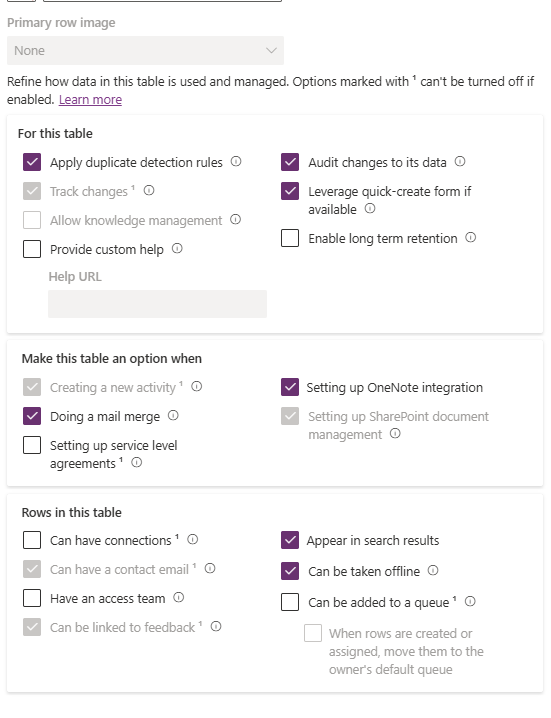
I experimented with options such as:
- Apply duplicate detection rules
- Track changes
- Allow knowledge management
- Audit changes to its data
- Appear in search results
- Can be added to a queue
- Can have connections
- Enable for activities
- SharePoint integration
- OneNote integration
- SLA support
- Offline availability
- Access teams
- Quick create support
- and many more…
Still No Luck
Even after enabling several combinations of settings:
Publishing customizations
Refreshing browser cache
Reopening the app
…the custom entity still did not appear in the Goal Rollup Query entity list.
At this point, I moved deeper into debugging.
Network Trace Investigation
I opened browser developer tools and started analyzing:
- API calls
- Metadata requests
- FetchXML behavior
- Filters applied to entity metadata
The idea was to identify:
“What exact condition determines whether an entity appears in the Entity Type dropdown?”
But surprisingly, the filtering logic wasn’t obvious from the network trace either.
The Actual Root Cause
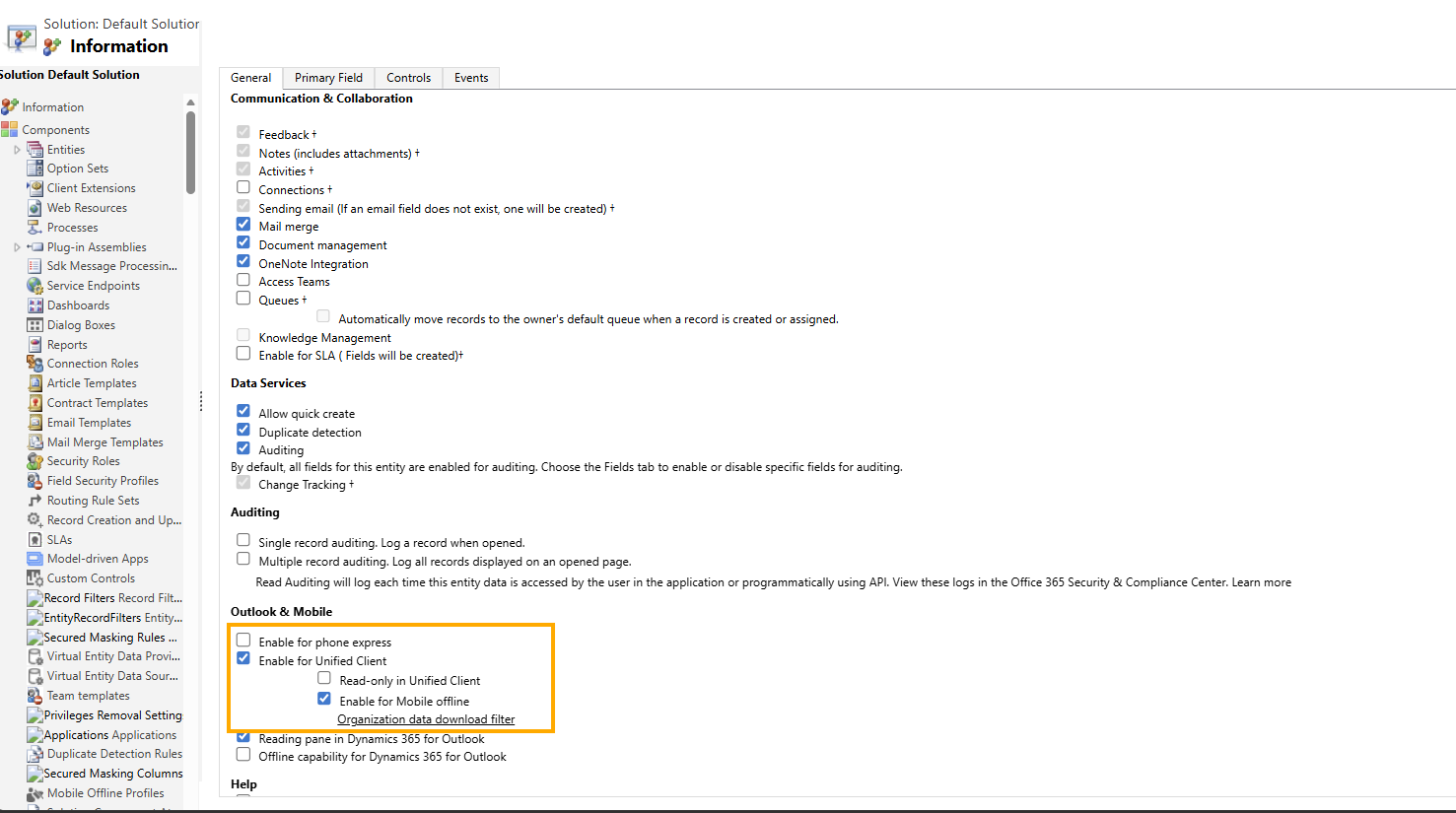
The issue was resolved only after enabling:
“Unified Client” / Unified Interface Support
Steps
- Go to:
Advanced Settings - Navigate to:
Customizations → Customize the System - Open your custom entity
- Under the General tab:
Enable:
“Enable for Unified Interface” / “Unified Client”
- Publish customizations
Why This Happens
This behavior is not very well documented, which makes it confusing.
Here’s the underlying logic:
Goal Rollup Queries are tied to functionality rendered through the Unified Interface / Model-Driven App framework.
When a custom table is created in Dataverse:
- It is NOT automatically enabled for Unified Interface.
- Microsoft assumes many custom tables are meant only for:
- integrations
- automation
- background processing
- plugins/workflows
- internal logic
Therefore, only entities considered “UI-ready” are exposed in certain UI-dependent features like Goal Rollup Queries.
If the table is not enabled for Unified Interface:
It may remain hidden from entity selectors even though the entity exists perfectly in Dataverse.
Important Learning
The key takeaway is:
Goal Rollup Query entity visibility is indirectly dependent on Unified Interface enablement.
This dependency is not intuitive because:
- the dropdown does not show validation messages,
- no warning appears,
- and entity metadata debugging doesn’t clearly reveal the requirement.
Microsoft Support Confirmation
Microsoft support confirmed the behavior with the following explanation:
“If a table needs to appear in a model-driven app or be used in the Unified Interface, it must be enabled manually. This ensures that only UI-ready tables are exposed to end users.”
Final Fix Summary
| Issue | Resolution |
|---|---|
| Custom entity missing in Goal Rollup Query | Enable Unified Interface / Unified Client |
| Location | Entity → General Tab |
| Required? | Yes, for UI exposure |
| Publish Required? | Yes |
Conclusion
This was one of those classic Dynamics 365 debugging journeys where:
- obvious settings were irrelevant,
- metadata gave no clear hint,
- and the actual solution was hidden behind a UI capability flag.
Hopefully this helps someone avoid losing multiple days troubleshooting the wrong configurations.
If you’re working extensively with:
- Goals
- Goal Metrics
- Rollup Queries
- Dataverse entities
- Model-driven apps
…then Unified Interface compatibility should definitely be part of your debugging checklist.


