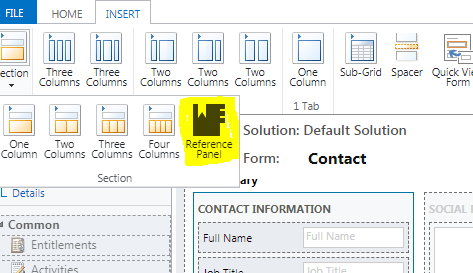
One More Option in Section,
A Reference Panel – A Reference panel is a single column section. You can insert sub grids, Quick view control, or a Knowledge Base Search control inside a Reference panel section.
Facts About Reference Panel
1. You cannot add all Controls, Only controls for Reference panel are Sub Grid, Quick View Control or a Knowledge Base Search control
2. You cannot add more than one Reference Panel.
3. There is only one Section in Reference panel.
4. Every Control needs to specify Icon
This Reference panel works actually on Unified interface Screens
On Normal Web
its look like below.
I have added two control ,
A – Quick View Control ( Icon of Rest Square)
B – Sub Grid Control ( Icon of Yammer)

Now Look Same Reference Control on Unified interface
This is how it looks, and it saves space on form and keep your form neat.
To deal with reference Pane programmatically
1. Get the reference panel section.
var refPanel = formContext.ui.tabs.get(TabName).sections.get(ReferencePanelSectionName);
2. Show/hide entire Reference Panel.
refPanel.setVisible(false/true);
a. True: To show the reference panel.
b. False: To hide the reference panel.
3. Get the components added inside reference panel
a. To Get the subgrid added in the reference section:
var contactSubGrid = formContext.ui.controls.get(SubGridName);
b. To Get the Quick view inside reference section:
var quickView = formContext.ui.quickForms.get(QuickViewFormName);


This is my first time go to see at here and i am actually impressed to
read everthing at single place.
LikeLike
Hello, i think that i saw you visited my blog so i came to “return the favor”.I am trying to
find things to enhance my site!I suppose its ok
to use some of your ideas!!
LikeLike