Users of CRM are actually not only the user of CRM, but CRM user are already a part of Office User and of course azure AD
The Core User management is in Azure Active Directory (AAD)
You can create user at 2 location, directly in AAD by login into Azure portal or from office portal.
If you are an Office 365, Azure or Dynamics CRM Online customer, you might not realize that you are already using Azure AD. Every Office 365, Azure and Dynamics CRM tenant is actually already an Azure AD tenant. Whenever you want you can start using that tenant to manage access to thousands of other cloud applications Azure AD integrates with!
Learn more about AAD here, Free trial is also available.
Why there is two different way to create users and above all , why we cannot create users in CRM directly.
1. Why we cannot create user in CRM?
CRM admin can be different and organization admin can be different.
Role is CRM with highest access is system administrator and system customizer but this can be a developer who has nothing to do with CRM user management and same we organization admin who is responsible to manage user, subscription and billing etc.
Microsoft developed a portal where admin of organization can manage users level management and buy products and license and assign users to those licenses.
This Portal is Office 365,
Office 365 is a collection of online services.
This service may or may not include
Dynamics 365 online
Excel online
Word online
OneNote Online
Skype for business
Power BI
Outlook online
Exchange
etc.
This products and managing access level in CRM will not satisfy the CRM definition.
2. Why users can be created in office 365 as well as azure portal?
Office 365 is collection of different online service but azure is SaaS which has collection of service or database and different OS in virtual machines.
So Azure mainly focus on development and deployment whereas office 365 mainly focus on products and subscriptions management.
when you create user in AAD the user will be reflected in Office 365 but with no license and then to manage it, you have to login and manage it through office 365.
So Microsoft recommended to create users at office 365, assign licenses.
To login and create user for Dynamics 365 –
You must have **Office 365 has different access role and Dynamics 365 has different access role.
global administrator role at office 365 –
This user will have access to all features in the admin center and can perform all tasks in the Office 365 admin center.
or specialized administrator role at office 365 –
User can manage specific areas of Office 365.
Setting > Security > User
In this section, admin can manage user settings, like
Approve/Reject Email – Primary email id is associated with user, this primary email needs to be approved to receive and send mails.
Promote to Admin – Selecting this will make current selected users to admin, that means, user will be assign a system administrator security role.
Manage Role – this will show all the list of security role (system and custom security role) and you can assign single or multiple security role to multiple users.
Change business unit – Business unit can be changed for current user
Change manager – Reporting manager can be changed directly
Change position – Position can be changed
Geo code of user – Uses Bing map to add and track geo location of an user
Open mailbox – This open up the current user mail box which includes mailing details of that user.But creating a user for CRM or editing or deleting is not in scope of CRM 365.
Users are always created via Azure or Office 365 admin portal.
To create User
Go to setting > Security > User > click new > Add and License Users.
Office 365 will be open up in new tab.
Login in Office Portal (Office 365 will not ask to login again if you are logged in user CRM)
This is one of the key benefit of Single Sign-On.
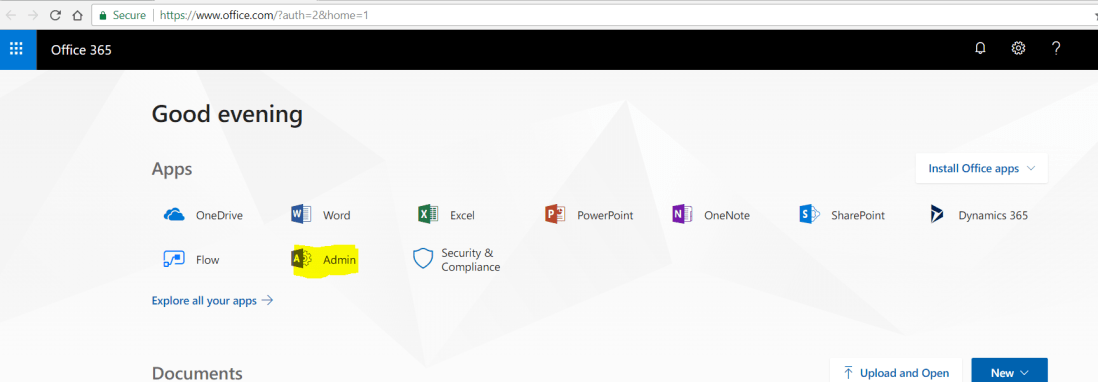
and go to add click admin app in Apps section.
if you don’t see this Admin app, you don’t have enough access to office and 365 and so you cannot manage office 365.
Admin will open up an admin portal where you can see different areas of Users, Group, resources, billing, support etc.
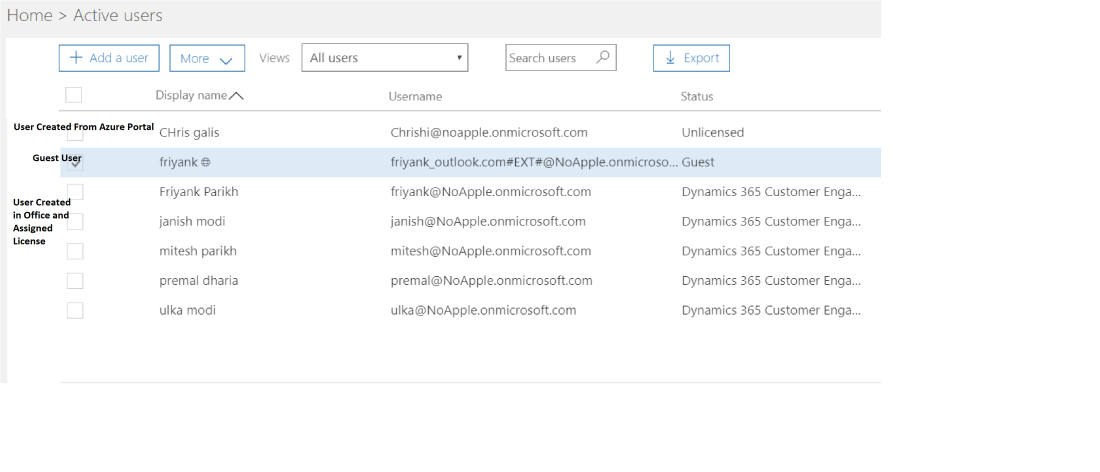
Users can be Member user or Guest users
Member user can be created from Office 365 but guest user can only be created from Azure Portal.
Guest User are for Azure Application and can be visible here in Office 365 but with #EXT added to user name created by office 365.
Adding User will have options of
domain selection – where we can create custom domain or companyname.onmicrosoft.com domain
Roles > This has three option
A user can havefull access of office 365 – Global Administration.
This user will have full access not only in Office 365 but in CRM user will automatically be assigned to two full access security role(System administrator and System customizer)
This user is mostly manager of organization or functional lead of application.No access of Office 365 – User (No Administration access)
This user will have no access in Office 365, but this user which are created can be assigned specific security role in CRM.
So for E.g. CRM needs developer or testers who has full access or minimal access in CRM but no access in admin center of office 365. this role is assign to those user at office 365.Partial access – Customized Administrator
This list includes many area of Office 365, Exchange administrator, SharePoint administrator, Skype and dynamics CRM service administrator.
if user is responsible for billing or password management, than giving full access of Office 365 will be of no use. So those users can be assign those customized specific rule.
Product License – This is where Office 365 is different from Azure portal in user management.
This area will list all the product and each product will have count of license {used} of {total} available.
You can also have user with no license, for e.g. if you want user to manage only billing details of office 365 then assigning a license will of no use.
But the user with no product license, cannot access or login into any product.
Admin can also create bulk user using excel import
User created here or in Azure will take some time to reflect in CRM.
Whenever an user is created in Office 365 and assigned license of D365, that user is created in CRM with following default values
User Name and Email is same a specified while user is created.
full name is also same as defined while creating user
But Team is always a default team created by CRM
Business unit always a default business unit created by CRM and
User is enabled by default.


 The Tech Burst